Qwen Review: Eight Projects in a Week Without Hitting a Limit
I went into Qwen expecting a competent free alternative and a quick disappointment. What I got was more interesting than that, and the disappointment, when it came, arrived from a direction I didn't expect.
Qwen is Alibaba's model family, and the consumer app is free. Over seven days I built three applications and five websites with it. I never hit a usage limit. Not once, not a soft throttle, nothing. Anyone who has spent a month rationing their work around a token ceiling will understand why that's the first thing I want to tell you.
It's also not the whole story, and the rest of it is what actually decides whether you should use it.
The free tier that doesn't tighten
Let me be precise about this, because it's the headline claim and I want it to be checkable: seven consecutive days, three apps and five sites, sustained work rather than casual questions. No wall.
That is a genuinely different experience from what I've described paying for Claude and ChatGPT, where the ceiling is real and shapes how you plan a working day. On Qwen I simply worked. For anyone learning, prototyping, or without a budget for subscriptions, that alone changes what's possible.
One clarification worth making, because it's the kind of thing that catches people out: the consumer app is what's free. Developer access through the API and the command-line tooling is priced separately and the free allowances there have changed over time. If your plan is to wire Qwen into a build pipeline rather than work in the app, check the current developer pricing before you commit to it — don't assume the free app implies free API.
Where it genuinely delivers
Several things are better than I expected from a free product:
The code output is complete. Not fragments requiring assembly — it produces whole, working pieces. For getting from an idea to something that runs, it holds up.
The graphics engine is excellent and the images are realistic. This surprised me most. Image generation is where I expected the clearest gap against the established Western tools, and it isn't there. They are clearly on a good path here.
Conversation is fluid. It moves naturally and doesn't feel stilted. The caveat is that you have to supply context on several things before it understands you properly — it doesn't infer as much from a short prompt as I'm used to. Front-load the explanation and it follows well.
The problem that actually cost me time
Here's the one that mattered day to day: the GitHub integration produces constant errors.
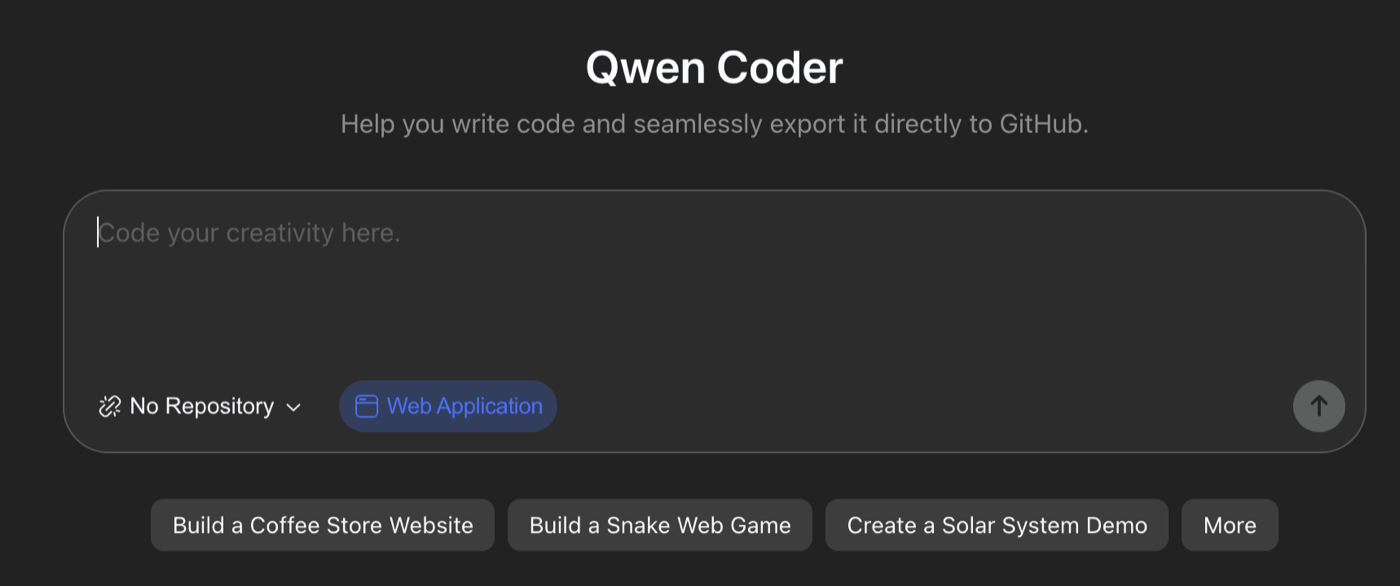
The product's own tagline is "Help you write code and seamlessly export it directly to GitHub." Seamless export is not a feature I inferred it might have — it's the promise on the front door, with a repository selector sitting right there in the composer.
That's the gap worth reporting. Not that a free tool lacks an integration, but that the integration is the headline claim and, in my week with it, it didn't hold.
In practice that means it isn't automatic. Every push and every deploy had to be done by hand. If you're building one small thing, that's a nuisance. If you're iterating on eight projects in a week, it's a real and repeated tax on your time — and it's the single concrete reason I wouldn't put Qwen at the centre of a working development setup as things stand.
Worth stressing that this is an integration failure, not a model failure. The code it writes is fine. Getting that code into a repository is where it breaks.
Why the output goes flat — and the structural reason
My substantive criticism is harder to see at first, because it doesn't show up in a single session. It shows up on the fifth one.
When you use it to design websites, landing pages or apps, the designs are very standard. Competent, clean, and interchangeable. The first output looks fine. By the eighth you realise you're being handed variations on the same thing.
I think there's a structural reason, and it's worth naming because it predicts the behaviour: you can't build skills into it, and it has no connectors to other tools. There's no mechanism to teach it your way of working, and no way to bring in anything outside the conversation. Everything it gives you comes from the same default starting point — so of course the results converge.
That's the trade being made. On tools where I can build my own skills, the assistant gradually stops producing generic output because it has been given a specific frame to work in. Qwen has no such frame, and no way to acquire one.
If you're beginning in design or code generation, none of this will bother you — the standard output is above where you are and it's genuinely useful. If you intend to push the tool hard, it goes flat and monotonous, and it goes there faster than you'd like.
How I'd actually use it
This is my real recommendation, and it isn't "use it" or "don't":
Use Qwen to develop your basic ideas. Take the code or the prompts it produces, and then refine them somewhere with more capability — Claude Code or similar.
It's very good for demos and drafts, and it's free, and that combination is worth appreciating rather than dismissing. The value is in the first 60 percent of the work: getting from nothing to a working draft, fast, with no meter running. Then you move it somewhere that can take it the rest of the way.
Framed as a draft machine, its weaknesses stop mattering. The standard designs are fine as a starting point. The manual GitHub work is tolerable when you're not deploying yet. What you get is unlimited, competent first drafts — and that is a real thing to have.
Qwen at a glance
| What I found | |
|---|---|
| Usage limits (consumer app) | None reached in 7 days across 8 projects |
| Cost | Free to use in the app; developer API priced separately |
| Code output | Complete and usable, not fragments |
| Image generation | Excellent — realistic, better than expected |
| Conversation | Fluid, but needs context supplied up front |
| GitHub integration | Constant errors; push and deploy done manually |
| Design output | Standard, and converges quickly with repeated use |
| Custom skills / connectors | Not available — the root of the flatness |
| Best used for | Demos, drafts, and developing an idea before refining elsewhere |
Based on my own use over one week. Free tiers and integrations in this category change quickly — check current terms before relying on any of it.
Who I'd recommend it to
- Anyone starting out in design or code generation — the standard output is genuinely helpful when you're learning, and the absence of a meter means you can practise as much as you want.
- Anyone prototyping — unlimited fast drafts is exactly what the early stage of a project needs.
- Anyone without a budget for subscriptions — this is the most capable free option I've used, and it isn't close.
Who I wouldn't recommend it to as a primary tool: anyone whose work depends on a smooth deployment pipeline, or who needs output that doesn't converge on the same shape after heavy use.
Frequently asked questions
Is Qwen really free?
The consumer app is, and in a week of sustained building I never hit a limit. Developer access via the API and command-line tooling is a separate matter with its own pricing, so check that before assuming free app means free API.
Is it good enough to replace ChatGPT or Claude?
Not as your primary tool, in my view — not because the model is weak, but because you can't build skills into it or connect it to anything, which makes its output converge. As a free companion for drafts, it earns its place easily.
How is its image generation?
Better than I expected. The graphics engine is excellent and the images are realistic. This was the biggest positive surprise.
What's the biggest practical problem?
The GitHub integration erroring constantly. It means pushes and deploys are manual, which is a repeated cost if you're iterating on several projects.
Who makes Qwen?
Alibaba. It's their model family, offered through a free consumer app as well as paid developer access.
Conclusion
Qwen is the most capable free AI tool I've used, and I'd rather say that plainly than damn it with faint praise about being good "for a free option". The code is complete, the images are genuinely impressive, and building for a week without once hitting a wall is an experience the paid tools haven't given me.
Its limits are real too, and they're structural rather than incidental: no skills, no connectors, and therefore output that converges. Plus a GitHub integration that doesn't work reliably enough to build a process on.
So use it for what it's excellent at — developing ideas, demos, drafts, getting to a working first version without a meter running — and take the result somewhere else to finish. Used that way, it's not a compromise. It's a genuinely useful part of a stack, and it costs nothing.
References & Bibliography
- Alibaba Cloud. "Qwen — model family overview." alibabacloud.com — Qwen
- Qwen. "Qwen Studio — official app." qwen.ai
- QwenLM. "Qwen open-source repositories and tooling." GitHub. github.com/QwenLM
- Wikipedia contributors. "Qwen." Background on the model family and its developer. en.wikipedia.org/wiki/Qwen
- zpromptify. "Editorial Policy: how we research and compare tools." zpromptify.com/editorial-policy