Claude vs. ChatGPT: What Paying for Both Actually Taught Me

Most comparisons of Claude and ChatGPT are written from feature lists. This one isn't. I've paid for both and used them on actual work — building small tools, drafting and planning, generating images, running multi-step projects. What follows is what I ran into, including the parts that annoyed me.
The short version: they are not really competing for the same job. ChatGPT is the better room to think in. Claude is the better place to build. Below is what led me there.
Claude: the free tier is a teacher, and that's not a compliment
The first thing I hit on Claude's free plan was how tight the usage limit is. You get going on something and the conversation stops. That constraint has an unexpected side effect: it forces you to write far more specific prompts. On a free plan you can't afford three vague attempts, so you learn to state exactly what you want the first time.
I'd genuinely recommend a week on the free tier for that reason alone — it teaches prompt discipline better than any tutorial. But it is not a plan you can work on. It's a plan you learn on.
What actually burns your quota
The limit isn't a flat message count, and that's the part worth understanding before you subscribe. In my use it depends almost entirely on what you ask it to work with:
- Plain conversation is cheap. You can range across topics, ask questions, go back and forth, and get a long way before anything tightens.
- Depth and presentation cost more. The more detail you want, and the more specific you are about how you want it laid out, the faster it adds up.
- Files and images are the real sink. The moment you ask it to read a document or look at an image, how much you get back drops sharply. This is where I most often ended up stranded halfway through something.
That last one is the practical warning I'd give anyone. Text-only work stretches a long way. Attach a few files and the same plan feels like a different product.
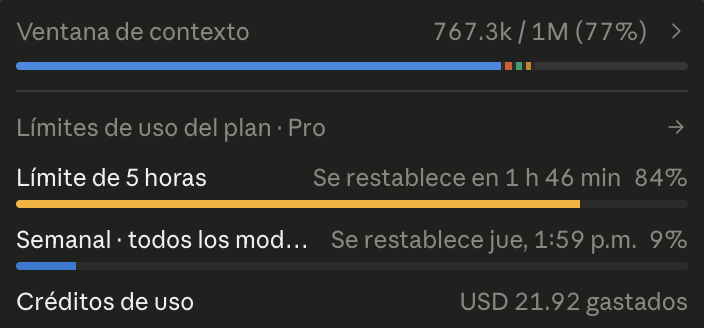
That screenshot shows something I hadn't fully understood until I looked at it properly, and it's the most useful thing in this article. The limit that stops you is the five-hour rolling window, not the weekly quota. There I'm at 84% of the five-hour limit with 1 hour 46 minutes until it resets — while the weekly allowance across all models sits at 9%.
In other words, I wasn't anywhere near using up my week. I was stopped by intensity, not volume. Concentrated work — the sort where you're iterating on a codebase for an afternoon — hits the short window long before the weekly one notices. That is exactly why you get stranded mid-project while your overall usage looks fine.
The context bar tells the other half of the story: 767,300 of 1,000,000 tokens, 77% full. That's what reading files does to a session, made visible.
The practical consequence, if you take one thing from this: if you keep hitting the wall, spreading the same work across more sessions helps more than using less of it. The constraint is how hard you push in five hours, not how much you do in a week.
A bad prompt is a billing problem, not just a quality one
This reframed how I work more than anything else. If the prompt doesn't carry the right context, the answer comes back off-target — and you've already spent the tokens. Then you spend more correcting it. Get the context wrong at the start and the whole thing comes apart underneath you.
So precision isn't just about better answers. On a metered plan it's cost control. This is also why the free tier ends up being decent training: it punishes vagueness immediately and visibly.
Paying opens a different product, not a bigger one
Subscribing changed what Claude is for me, more than how much of it I got. The big unlock was Claude Code: I was able to build working software, not just get text back about how I might build it. That's a different category of usefulness.
Concretely, what I've built with it: HTML web pages, projects in Java and Python, web apps, and several control dashboards. It is genuinely strong at this — that's the part of the subscription I'd defend without hesitation.
Two features did the most work once I was inside:
- Projects — somewhere to develop an idea over time instead of re-explaining context in every new conversation.
- Skills — the single biggest efficiency gain I found. Building your own skills for the things you repeat turns a general assistant into one that already knows your way of working.
Beyond the ones that ship by default, I've built skills for administration, marketing, engineering, design, market research and affiliate marketing. The one I'd single out is data analysis — that's the one that changed the most about how I work, and the first I'd recommend building if you're only going to make one.
A gap I noticed while doing this: there are free skills shared by their creators, but I couldn't find a good source of ready-made skill packs for common workflows. That's an opinion about the ecosystem rather than a product complaint — but if you're starting out, expect to build your own rather than download them.
The ceiling doesn't disappear when you pay
Here is the part I'd want to know before subscribing, and the part the pricing page doesn't convey: on the paid plan I still ran out. The limit is higher, but on a real working session — long files, iterating on code — the tokens still run out and you wait.
This is my main reservation about Claude, and it's a real one. If your work comes in long, intense sessions rather than short questions, budget for hitting the ceiling. It hasn't stopped me using it, but it did change how I plan a day's work around it.
Cowork: where it stopped feeling like a chatbot
The thing that impressed me most was Cowork. Being able to delegate tasks — and have several agents working on different areas at once — is a genuine productivity change, not a marginal one. It's the first time using one of these tools felt less like asking questions and more like handing off work.
That capability is the reason I'd say Claude is currently ahead for business and development work specifically. Not because it writes better sentences, but because you can give it a job rather than a prompt.
ChatGPT: the better room to think in
ChatGPT is the one I open to work an idea out. The conversational range is wider and the surrounding tools are more varied. For building plans, developing an idea from something half-formed, or generating options, it's the more comfortable place to be.
Its image generation sits in a useful middle: not basic, but not professional-grade either. Semi-professional is the honest description — fine for most everyday needs. Its memory also helps: it holds on to the basic shape of what you're working on across conversations.
The use I'd single out, because I don't see it mentioned much: ChatGPT is excellent at writing prompts for other platforms. If you're trying to get something specific out of an image generator or another model, having ChatGPT draft and refine that prompt first works noticeably better than writing it yourself. It has become a standard step in how I work.
Where ChatGPT thins out
My honest criticism: it can feel flat. When a conversation gets genuinely complicated, the answers start to feel forced — like it's producing a response shaped like an answer rather than actually following the difficulty. It's the point where I tend to move the problem to Claude.
I'd stress this is about hard, layered problems. For everyday work it doesn't come up.
Worth noting that neither of these is the only option worth your time. I've since spent a week building on Alibaba's Qwen, which is free and never once cut me off — a genuinely different experience from rationing tokens, and one with its own clear trade-offs.
Claude vs. ChatGPT at a glance
| Claude | ChatGPT | |
|---|---|---|
| Where it's strongest | Building things; delegated, multi-step work | Thinking things through; planning and ideation |
| Free tier, in practice | Very tight — good for learning prompt discipline, not for working | More room for casual use |
| What paying unlocked for me | Claude Code, Projects, Skills, Cowork | Higher limits and the wider tool set |
| Usage ceiling on the paid plan | Still hit it — fastest when reading files or images | Less of a day-to-day obstacle for me |
| What I've built with it | HTML pages, Java, Python, web apps, control dashboards | Plans, drafts, prompts for other tools, everyday images |
| Image generation | Not a focus | Semi-professional; fine for everyday use |
| Weak spot I ran into | Running out of tokens mid-task | Flat, forced answers on complex problems |
This table summarizes my own experience on paid plans. Your mileage will differ with a different kind of workload — see the references for each vendor's published limits and pricing.
How to choose between them
If I had to keep one, it would depend entirely on the work:
- You build things — code, tools, multi-step projects: Claude, for Claude Code, Skills and Cowork. Accept that you'll hit the ceiling sometimes.
- You think and plan — strategy, ideas, drafting, occasional images: ChatGPT. Wider room, fewer walls.
- You use other AI platforms a lot: keep ChatGPT regardless, purely as your prompt-writing tool for everything else.
In practice I pay for both, and I don't think that's an evasion. They're doing different jobs. What I would not do is pay for either expecting the free tier experience to simply get bigger — what changes is what the product lets you do, not just how much.
Frequently asked questions
Is Claude's free plan usable for real work?
In my experience, no — the limit is too tight to sustain a working session. It is genuinely worth a week, though, because working under that constraint teaches you to write much more precise prompts.
Do the usage limits go away if you pay?
Not in my case. The ceiling is higher and you have more room to move, but the pattern is identical — and on long sessions involving files I still ran out. Plan around it rather than assuming it's solved.
What uses up tokens fastest?
In my experience, asking it to read files or look at images. Plain conversation stretches a long way; attaching documents shortens the session dramatically. Imprecise prompts are the other drain, because you pay for the off-target answer and then pay again to fix it.
What can you actually build with Claude Code?
I've used it for HTML pages, Java and Python projects, web apps and several control dashboards. It's the strongest part of the paid plan for me.
Which one is better for images?
Of these two, ChatGPT — its output is semi-professional and fine for everyday use. For design work I'd use a dedicated tool instead.
Is it worth paying for both?
I do, because they solve different problems for me. If you only build, or only plan, one will cover you.
Conclusion
For business and development work as of today, I'd put Claude ahead — not on writing quality, but because Claude Code, Skills and Cowork let you hand over work instead of prompting for it. ChatGPT keeps its place as the better thinking space and as the tool I use to write prompts for everything else.
The caveat I'd repeat to anyone about to subscribe: on both, and on Claude especially, the usage ceiling is a real constraint on how you plan your day — and it bites hardest exactly when you start attaching files, which is usually when the work gets serious. It's the thing I most wish someone had told me before I paid.
If you take one practical habit from this: write the prompt carefully the first time. On a metered plan, vagueness isn't just a worse answer — it's a bill.
References & Bibliography
- Anthropic. "Claude plans and usage limits." Official documentation. anthropic.com/pricing
- Anthropic. "Claude Code documentation." docs.anthropic.com
- Anthropic. "Agent Skills documentation." docs.anthropic.com
- OpenAI. "ChatGPT plans and pricing." Official documentation. openai.com/chatgpt/pricing
- OpenAI. "Memory and new controls for ChatGPT." openai.com
- zpromptify. "Editorial Policy: how we research and compare tools." zpromptify.com/editorial-policy